

Insivia Labs
AI-assisted content management and website demos
From a working demo to a reviewed release
Insivia Labs is the workspace I built to help our team turn a website direction into something people can explore. Content libraries, responsive previews, structured editing and an AI assistant bring the work together, with a review path from development to production.
In production
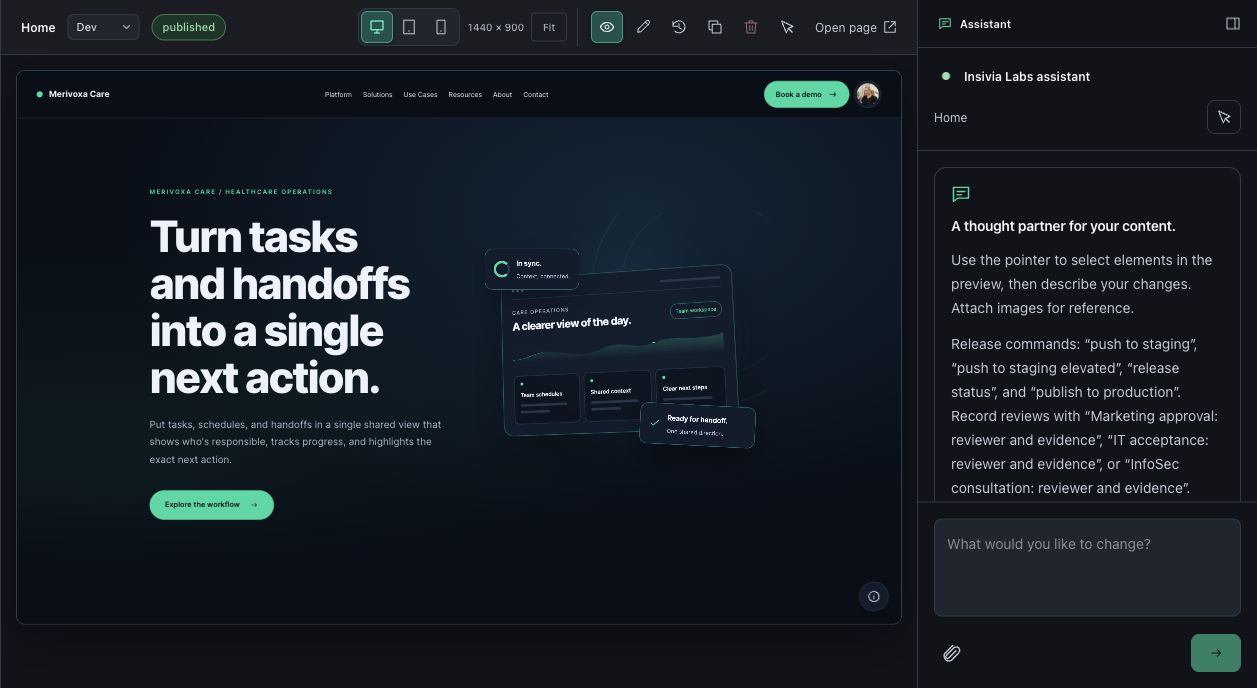
Real workspace · client-identifying areas cropped out
Why build a workspace for website demos?

A working conversation
A static mockup can show a direction, but a working demo lets the team explore the experience together. I wanted one place to organize each client’s content, try ideas in context and move from a conversation about the website to a version people can actually use.
What can the team do in Labs?
Inside the workspace
I designed and developed a multi-client workspace for pages, posts, landing pages, HTML graphics, media and forms. The content library keeps those pieces organized, while desktop, tablet and phone previews show how the actual page responds.
The section editor lets the team shape a page with reusable blocks and page settings. Beside the preview, the Insivia Labs assistant provides a place to describe changes, select page elements and attach visual references. Previewing, comparing and applying edits keeps people involved in the decision.
Inside Insivia Labs
Actual application screens. Client-identifying areas are cropped out; the demo uses fictional branding. Open a screen to explore it at full size.
Technical details
- React, Node.js, Vite and Tailwind CSS, with reusable content blocks and industry design tokens.
- Supabase persistence and Google sign-in, with role and workspace access checks.
- Optional OpenAI-assisted proposals, revision recovery and responsive device previews.
- Dev, staging and production are content snapshots, not Git branches or automated code deployments. Some dashboard metrics are demonstration data, and several integration connections are still planned.
How does a change reach the website?
Review before release
Edits begin in dev. A staging snapshot creates a fixed candidate for review, with Marketing approval, IT acceptance and InfoSec consultation controls. Publishing uses that candidate rather than whatever happens to be changing in dev. Revision history supports recovery, while application code follows its own Git workflow.
Where does the project stand?
Status
Live for authorized Insivia users at labs.insivia.com. The workspace supports content editing, responsive previews, revisions and staged releases. Development continues; some dashboard metrics are demonstration data and integration availability varies.
Want to talk about the work?
Connect on LinkedIn